
Audio visual technology improves modern corporate environments by making communication clearer, meetings more productive, and workplace information easier to access. Well-planned corporate AV solutions connect employees across offices, reduce communication barriers, support people with different accessibility needs, and create a more consistent experience in meeting rooms, training areas, reception spaces, and shared work environments.
Modern employees expect workplace technology to function without unnecessary delays. They need to hear every speaker, view every presentation, and participate whether they are in the room or joining remotely. However, poor sound, unclear displays, weak video connections, and complicated controls can quickly interrupt that experience. As a result, businesses need AV systems that support how their teams actually communicate and work.
Capstream Technologies helps businesses in Olean, NY, create reliable and user-friendly corporate environments through professional AV planning, installation, and support. By combining clear displays, dependable audio, video conferencing tools, assistive listening technology, and centralized controls, Capstream Technologies helps organizations build spaces that support employees, visitors, clients, and presenters.
What Is Audio Visual Technology in a Corporate Environment?
Corporate audio visual technology includes the equipment, software, controls, and infrastructure that businesses use to communicate visually and audibly. These systems may support meetings, presentations, employee training, company announcements, customer interactions, and remote collaboration.
A modern AV system can include displays, projectors, microphones, speakers, video conferencing cameras, digital signage, control panels, room scheduling tools, and assistive listening devices. However, effective AV design involves more than installing individual devices. Every component must work together as one reliable system.
For example, a meeting room may contain a large display, several ceiling microphones, speakers, a video camera, and a room control panel. When the system is designed correctly, an employee can start a meeting, share a screen, adjust the volume, and connect remote participants without needing technical support.
In contrast, poorly integrated equipment creates friction. Employees may struggle to find the right cable, connect their laptop, hear remote participants, or adjust the display. Therefore, businesses should approach AV technology as part of their communication infrastructure rather than as a collection of unrelated devices.
The Communication Challenges Modern Workplaces Must Solve
Modern corporate environments have changed significantly. Many organizations now manage hybrid teams, flexible schedules, remote employees, multiple office locations, and digital-first communication. At the same time, businesses must ensure that workplace information remains clear and accessible to every user. A typical meeting may include employees sitting around a conference table, managers joining from another office, remote workers connecting from home, and clients participating from another city. Each person needs an equal opportunity to hear, speak, see content, and contribute.
However, several problems can affect that experience. Room acoustics may make speech difficult to understand. Small displays may prevent employees from reading detailed content. In addition, weak microphones may fail to capture quieter speakers. Remote participants may also feel disconnected when they cannot see the entire room.
These issues do more than create inconvenience. They can slow down decisions, reduce participation, increase meeting fatigue, and cause employees to miss important information. Therefore, effective AV Services should address the physical room, the technology, the users, and the communication goals of the organization.
Why Audio Visual Technology Matters in Modern Offices
Audio visual technology plays a direct role in productivity, accessibility, employee engagement, and business communication. When employees can use meeting rooms and presentation systems without confusion, they can focus on the discussion instead of troubleshooting equipment.
Reliable systems also create consistency. Employees should not need to learn a completely different process each time they enter another meeting room. Instead, controls, connections, and basic functions should remain familiar across the workplace.
Businesses often invest in modern AV systems for the following reasons:
- Clearer communication: High-quality microphones, speakers, and displays help employees understand presentations and conversations. Clear communication reduces repeated questions and prevents important details from being missed.
- Better hybrid collaboration: Cameras, conferencing platforms, room microphones, and shared displays allow on-site and remote employees to participate in the same discussion.
- Greater accessibility: Assistive listening systems, readable displays, captions, and simple controls support users with different hearing, vision, mobility, and technology needs.
- Improved employee engagement: People are more likely to participate when they can clearly hear the discussion, view the content, and contribute without technical barriers.
- More professional presentations: Reliable AV systems help businesses present information confidently to employees, customers, partners, and stakeholders.
As a result, thoughtfully designed corporate AV solutions can improve both daily operations and the overall experience of the workplace.
Assistive Listening Systems Improve Audio Access
Assistive listening systems help individuals hear spoken communication more clearly in conference rooms, training spaces, auditoriums, and presentation areas. These systems can send audio directly to a compatible receiver or personal hearing device. Common options include hearing loop, radio frequency, and infrared systems. The most suitable system depends on the room, privacy requirements, number of users, and existing equipment.
For example, a hearing loop system can transmit sound to compatible hearing aids or receivers. Meanwhile, an infrared system may work well in a space where the organization wants to keep the audio signal contained within the room. However, businesses should not select assistive technology without evaluating the environment. Room size, wall materials, electronic interference, seating arrangements, and nearby spaces can affect system performance.
A professional AV provider can assess these conditions and recommend a suitable solution. In addition, proper training helps employees understand how to provide receivers, explain the system, and assist users when needed.
Clear Visual Displays Make Information Easier to Understand
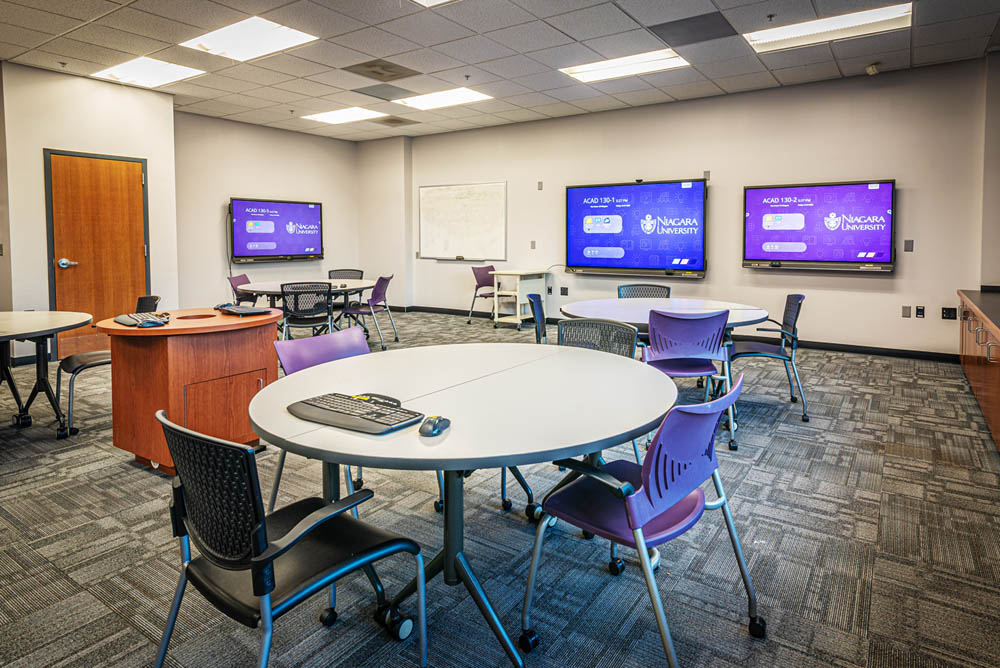
Visual displays affect how well employees absorb presentations, dashboards, training materials, and company announcements. If a display is too small, too dim, or positioned poorly, employees may struggle to read the content. The correct display size depends on the viewing distance and the type of content shown. For instance, a screen used for detailed spreadsheets may need to be larger than a screen used mainly for video calls.
Likewise, brightness matters. A display placed near large windows may need higher brightness to remain visible during the day. In addition, businesses should consider glare, mounting height, viewing angles, and room lighting. Readable presentation design also supports accessibility. Presenters should use clear fonts, strong contrast, short sections of text, and visuals that remain understandable from the back of the room.
Digital signage can extend these benefits beyond meeting spaces. Businesses can use displays in reception areas, hallways, employee break rooms, and production environments to communicate schedules, directions, safety messages, announcements, and performance updates.
Video Conferencing Creates More Equal Participation
Hybrid meetings can only succeed when remote participants receive a clear and complete view of the conversation. A laptop placed at the end of a long conference table rarely provides that experience. Instead, modern conference rooms may use wide-angle cameras, speaker-tracking cameras, multiple displays, ceiling microphones, and room speakers. These tools help remote employees see who is speaking and follow the discussion naturally. Room layout also matters. Cameras should capture participants without creating awkward angles. Microphones should pick up speech across the table. In addition, speakers should deliver remote voices at a comfortable volume.
Dual displays can further improve hybrid meetings. One display may show remote participants, while the second presents shared content. Therefore, employees do not need to choose between seeing their colleagues and viewing the presentation. Most importantly, the system should remain simple. Employees should be able to join the meeting, select the correct camera, and share content without navigating several complicated menus.
Step-by-Step Process for Planning a Corporate AV Upgrade
A successful AV project starts with the business need, not the equipment. Before selecting displays, speakers, or cameras, the organization should identify how each room is used, who uses it, and what communication problems currently affect employees.
- 1. Assess the current environment: Review each meeting room, training area, reception space, and shared workspace. Document existing equipment, connection problems, room acoustics, lighting, viewing distances, accessibility needs, and common employee complaints.
- 2. Define the room’s purpose: Determine whether the space supports video conferencing, employee training, customer presentations, executive meetings, digital signage, or several activities. Clear goals help prevent unnecessary equipment purchases.
- 3. Identify user requirements: Consider employees, clients, guests, remote participants, presenters, and users with accessibility needs. The system should support frequent users while remaining simple enough for first-time visitors.
- 4. Design an integrated system: Select compatible displays, cameras, microphones, speakers, controls, cabling, and conferencing platforms. Each component should support the room’s purpose and work within the existing network infrastructure.
- 5. Install, test, and train: After installation, test the system under realistic conditions. Conduct video calls, share presentations, check audio coverage, review display visibility, and train employees on everyday controls.
A structured process reduces costly changes and creates a better user experience. Contact Capstream Technologies to plan an AV system that supports your rooms, employees, and long-term communication goals.
When Should a Business Upgrade Its AV Systems?
Businesses should consider an AV upgrade when existing systems interrupt communication, no longer support current workflows, or require frequent repairs. An upgrade may also become necessary when the organization moves into a new office, renovates a workspace, expands its team, or adopts a hybrid work model. Frequent meeting delays often provide the clearest warning. Employees should not spend the first ten minutes of every meeting looking for adapters, adjusting audio, or restarting a conferencing platform.
Poor sound quality is another sign. If participants regularly ask speakers to repeat themselves, the room may need better microphones, speakers, acoustic treatment, or audio processing. Businesses should also review display performance. Small screens, low resolution, poor brightness, and limited connection options may prevent teams from presenting detailed content effectively.
In addition, changes in workplace accessibility needs may require new technology. Assistive listening devices, captions, larger displays, and simpler controls can make communication available to more people. Organizations should review AV performance regularly rather than waiting for a complete failure. Proactive reviews allow businesses to plan budgets, schedule installations, and reduce disruption.
Where Corporate AV Systems Deliver the Most Value
AV technology can improve almost every communication-focused area within a corporate environment. However, the system should reflect the purpose and user needs of each space. Conference rooms often require video conferencing, microphones, speakers, displays, screen sharing, and room controls. Smaller huddle rooms may need simpler systems that allow employees to begin a video call quickly.
Training rooms may require larger displays, presenter microphones, recording tools, assistive listening systems, and flexible audio coverage. These features help instructors communicate with both in-person and remote participants. Executive boardrooms often need discreet equipment, high-quality audio, secure conferencing, multiple displays, and centralized controls. The system should provide strong performance without distracting from the room’s design.
Reception areas can use digital signage to welcome visitors, provide directions, promote company services, and share important announcements. Meanwhile, employee common areas can display internal updates, schedules, safety information, and company achievements. Professional AV Services can also support auditoriums, customer demonstration rooms, command centers, healthcare offices, educational environments, houses of worship, and municipal facilities.
Who Benefits From Modern AV Technology?
Modern AV systems support more than executives and presenters. They affect every person who communicates, learns, visits, or collaborates within the workplace.
- Employees: Clear sound, reliable displays, and simple controls help employees hold meetings, share ideas, complete training, and communicate with remote colleagues.
- Remote team members: Quality cameras, microphones, and conferencing systems help remote employees see the room, hear conversations, and participate in decisions.
- Visitors and clients: Professional presentation systems create a stronger first impression and make demonstrations, proposals, and onboarding sessions easier to understand.
- Employees with accessibility needs: Assistive listening systems, captions, clear displays, and accessible controls reduce barriers to communication and participation.
- IT and facility teams: Standardized equipment, centralized controls, remote monitoring, and professional support reduce troubleshooting demands and improve system reliability.
Because many groups depend on the same technology, AV planning should involve representatives from leadership, IT, facilities, human resources, and everyday users.
How Much Do Corporate AV Systems Cost?
The cost of a corporate AV project depends on room size, system complexity, equipment quality, installation requirements, and existing infrastructure. A small huddle room usually needs fewer components than a large training room or executive boardroom.
The following table provides general project considerations rather than fixed pricing. A professional site assessment is necessary for an accurate estimate.
| Cost Factor | Lower-Complexity Project | Higher-Complexity Project |
| Room size | Small office or huddle room | Boardroom, training room, or auditorium |
| Display system | One commercial display | Multiple displays or large-format video wall |
| Audio equipment | Basic microphone and speakers | Multiple microphones, audio processing, and zoned speakers |
| Video conferencing | Single camera system | Multiple cameras with speaker tracking |
| Room controls | Basic remote or touch control | Centralized and automated control system |
| Accessibility features | Captions or portable receivers | Integrated assistive listening and advanced visual support |
| Installation | Existing cabling and power available | New cabling, mounting, electrical, or network work |
| Support | Basic user training | Ongoing monitoring, maintenance, and technical support |
Although budget matters, businesses should avoid selecting equipment based only on the lowest upfront price. Low-cost devices may lack commercial durability, compatibility, support, or security features.
Instead, the organization should compare the total value of the system. This includes installation quality, employee time saved, equipment lifespan, maintenance needs, and the ability to expand later.
Traditional Meeting Rooms vs. Modern AV-Enabled Rooms
Traditional meeting rooms often rely on basic displays, individual laptop cameras, loose cables, and manual controls. These rooms may work for small in-person discussions, but they often create problems during hybrid meetings or detailed presentations.
Modern AV-enabled rooms offer a more integrated experience.
| Feature | Traditional Meeting Room | Modern AV-Enabled Room |
| Meeting setup | Several manual connections | Simplified or one-touch startup |
| Audio coverage | Laptop or tabletop microphone | Microphones designed for full-room coverage |
| Camera view | Limited view from one position | Wide-angle, tracking, or multiple-camera coverage |
| Remote participation | Remote users may feel disconnected | More equal participation for in-room and remote users |
| Display visibility | Consumer screen or small display | Commercial display selected for room size |
| Accessibility | Added only when requested | Considered during planning and system design |
| Controls | Separate remotes and devices | Centralized control interface |
| Support | Reactive troubleshooting | Planned maintenance and professional support |
| Scalability | Difficult to expand | Designed for future upgrades and integration |
The best option depends on the organization’s needs. However, businesses that rely on frequent presentations, remote collaboration, or employee training usually gain more value from an integrated system.
How AV Technology Supports Different Corporate Applications
Corporate AV technology should adapt to the communication activity taking place. A system designed for executive meetings may not meet the needs of a large employee training program. For presentations, employees need readable displays, reliable screen sharing, clear speech reinforcement, and simple source selection. Presenters should be able to focus on their message rather than the equipment.
For employee training, organizations may need microphones, recording tools, interactive displays, remote participation, and assistive listening technology. In addition, trainers may need to switch between slides, videos, live demonstrations, and audience questions.
For digital signage, businesses need commercial displays, content management software, reliable network connections, and a clear content schedule. Messages should remain short, readable, and relevant to the location of each display. For hybrid collaboration, the system should support natural conversation. Remote employees should hear side discussions, identify speakers, and view shared content. Likewise, employees in the room should hear remote participants clearly.
Therefore, AV design should begin with the desired experience and then identify the equipment required to support it.
Measuring the Success of an AV Upgrade
Businesses should measure AV success through the employee experience rather than equipment specifications alone. A system may include advanced technology, but it does not provide value if employees struggle to use it. Meeting startup time offers one useful measurement. After an upgrade, employees should spend less time connecting devices, selecting inputs, and adjusting settings.
Support requests can also reveal system performance. A reduction in repeated tickets may indicate that controls have become easier to understand and equipment has become more reliable. Employee feedback provides additional context. Ask users whether they can hear remote participants, read shared content, start meetings independently, and use accessibility features. Organizations can also review room use. A previously avoided conference room may become more popular after the business improves its sound, display visibility, or conferencing tools. Other indicators include fewer interrupted presentations, stronger remote participation, improved training completion, and greater confidence when hosting clients.
Most importantly, continue reviewing the system after installation. Workplace needs change as teams grow, software platforms evolve, and communication habits shift.
Corporate AV Planning for Businesses in Olean, NY
Businesses in Olean may use AV technology to support local employees, remote workers, customers, students, healthcare teams, municipal staff, and community members. However, every organization has a different building, network, room layout, and communication process.
A local office may need a reliable conference room for meetings with customers outside Western New York. A training facility may need clear audio and visual coverage for groups of different sizes. Meanwhile, a professional office may need digital displays for visitor information and internal communication.
Local planning allows the AV provider to evaluate the actual environment. The assessment can include room dimensions, lighting, wall construction, acoustics, network access, power availability, and existing equipment.
Businesses exploring Corporate AV Solutions in Olean, NY should begin with a clear discussion about their communication problems, accessibility goals, and plans for future growth. This approach creates a system that fits the business instead of forcing employees to adapt to unsuitable technology.
Conclusion
Audio visual technology can transform a modern corporate environment by making communication clearer, collaboration easier, and information more accessible. Displays, microphones, speakers, conferencing systems, digital signage, assistive listening technology, and room controls each play an important role. However, successful systems require more than high-quality equipment. Businesses must understand the room, the users, the communication goals, and the existing infrastructure. They should also plan for accessibility, maintenance, employee training, and future expansion.
The right corporate AV solutions reduce technical delays and allow employees to focus on their work. They also help remote participants contribute, support people with different accessibility needs, and create a more professional experience for clients and visitors.
Capstream Technologies provides professional AV Services for businesses that want reliable, accessible, and easy-to-use communication environments. Whether your organization is improving a meeting room, planning a training space, adding digital displays, or upgrading video conferencing technology, Capstream Technologies can design a system around your users and operational goals. Contact Capstream Technologies today to discuss your corporate AV project in Olean, NY.

Howard Martin, Jr. is an Owner/Partner at Capstream Technologies with more than 20 years of experience in IT, finance, and business strategy. He oversees finance, accounting, customer support, and business development while helping organizations identify practical technology solutions that support real operational needs.