
Modern meetings should move fast. Yet many teams still lose time to weak microphones, poor camera angles, screen sharing issues, and confusing controls. When that happens, the room stops supporting the meeting and starts slowing it down. That is why conference room audio visual solutions matter so much today. They help teams hear clearly, present smoothly, and collaborate with less friction in both in-person and hybrid meetings.
For modern businesses, the problem is not only bad sound or blurry video. It is lost productivity. It is repeated explanations for remote participants. It is delayed decisions because the room is not ready when people are. In other words, outdated meeting technology creates a daily drag on communication, teamwork, and professionalism.
At the same time, workplace expectations have changed. Teams now move between office, home, and client sites. Meetings often include remote staff, leaders in another city, and partners joining from mobile devices. As a result, businesses need meeting spaces that feel simple, reliable, and consistent. That is where conference room audio visual solutions create real value. They combine audio, video, room control, and collaboration tools into one system that works the way people actually meet.
For companies in Buffalo, Western New York, and Central New York, Capstream Technologies positions its services around tailored commercial AV systems, hybrid meeting setups, installation, calibration, and long-term support rather than one-off equipment sales. The company highlights scalable systems for conference rooms, training spaces, and shared business environments.
1. Why Poor Meeting Room Technology Is Costing Businesses Time and Productivity
Poor meeting room technology causes more damage than most companies realize. First, it wastes time at the start of meetings. Someone has to reconnect the display. Someone else has to move the laptop cable. Then another person says the remote team cannot hear clearly. These small delays add up every week.
Second, weak AV systems reduce the quality of communication. If voices sound distant, people miss key details. If the camera captures only one side of the table, remote attendees feel disconnected. If the display is too small, shared content loses its impact. Over time, these issues reduce confidence in the room and in the meeting itself.
Third, outdated systems hurt the business image. Clients, partners, and executive teams expect smooth presentations and professional communication. A room that fails during a sales pitch or leadership meeting can weaken that impression right away.
Common productivity losses from poor room technology include:
- Extra minutes spent starting each meeting
- Repeated troubleshooting during calls
- Weak participation from remote attendees
- Lower attention during presentations
- Delayed decisions because communication feels fragmented
This is why companies now treat AV as business infrastructure, not just office equipment. A strong meeting environment helps teams move faster, communicate better, and stay focused on results.
2. What Are Conference Room Audio Visual Solutions?
Conference room audio visual solutions are integrated systems that help people communicate, present, and collaborate inside a meeting space. They usually include displays, microphones, speakers, cameras, conferencing software, control tools, and the supporting cabling or network design behind them.
In simple terms, these solutions make the room work as one complete environment. Instead of relying on separate devices that may or may not connect well, businesses use a coordinated system designed for the room size, the meeting style, and the needs of the users.
A modern setup may support many types of activity, such as:
- internal team meetings
- client presentations
- board meetings
- hybrid video calls
- training sessions
- webinars and live collaboration
The key goal is consistency. When employees walk into the room, they should know how to start the meeting, share content, and communicate with remote participants without confusion.
3. How AV Solutions Combine Audio, Video, Control, and Collaboration Tools
A strong AV system does not depend on one great screen or one expensive microphone. It works because multiple tools are planned together.
Audio tools capture and play sound. That includes microphones, speakers, amplifiers, and digital signal processing. These parts shape how voices are picked up and how clearly people hear in the room.
Video tools handle what people see. That usually includes displays, projectors, cameras, switchers, and presentation sources. In hybrid meetings, video quality matters because remote attendees rely on camera framing, screen content, and visual clarity to stay engaged.
Control tools make the room easier to use. Touch panels, simple button layouts, and automated startup settings reduce confusion. People should not need a long training session to begin a meeting.
Collaboration tools connect the room to how teams already work. That can include Microsoft Teams Rooms, Zoom Rooms, wireless screen sharing, room PCs, or other unified communication platforms. When these tools work together, the room feels simple even when the system itself is advanced.
4. The Difference Between Basic Meeting Room Tech and an Integrated AV System
Many businesses start with a basic setup. They buy a large TV, a speakerphone, and maybe a webcam. That can work for a short time in a small room. However, once the meeting space grows, or hybrid meetings become common, the limits show quickly.
A basic room setup often creates problems such as:
- Uneven voice pickup
- Poor sound coverage across the room
- Limited camera range
- Weak compatibility with conferencing tools
- Too many cables and adapters
- Confusing startup steps
An integrated AV system solves those issues through design. Each part is selected for the room and for the workflow. The microphones fit the room size. The display fits the viewing distance. The conferencing tools align with the company platform. The controls reduce user error.
That difference matters. A basic setup is a collection of devices. An integrated system is a business tool built for reliable performance.
5. Why Conference Room AV Solutions Matter in Modern Workplaces
Modern workplaces are not all the same. Some companies need small huddle rooms for quick team updates. Others need boardrooms for executive strategy. Some organizations need training rooms, multi-use spaces, or client-facing presentation environments. Each space has different demands. Still, all of them benefit from well-designed conference room audio visual solutions.
In a corporate office, AV supports faster decisions. Team members can present data, review dashboards, and include remote leaders without losing momentum. In a client-facing business, the room helps create trust. Clear sound and polished visuals make presentations feel more professional. In a training environment, AV helps people learn faster by making content easier to see and hear.
Hybrid work makes these systems even more important. Employees now expect equal participation whether they are in the room or online. Good AV closes that gap. It helps remote participants hear side conversations less and hear the main conversation more. It also helps in-room participants share content without delays.
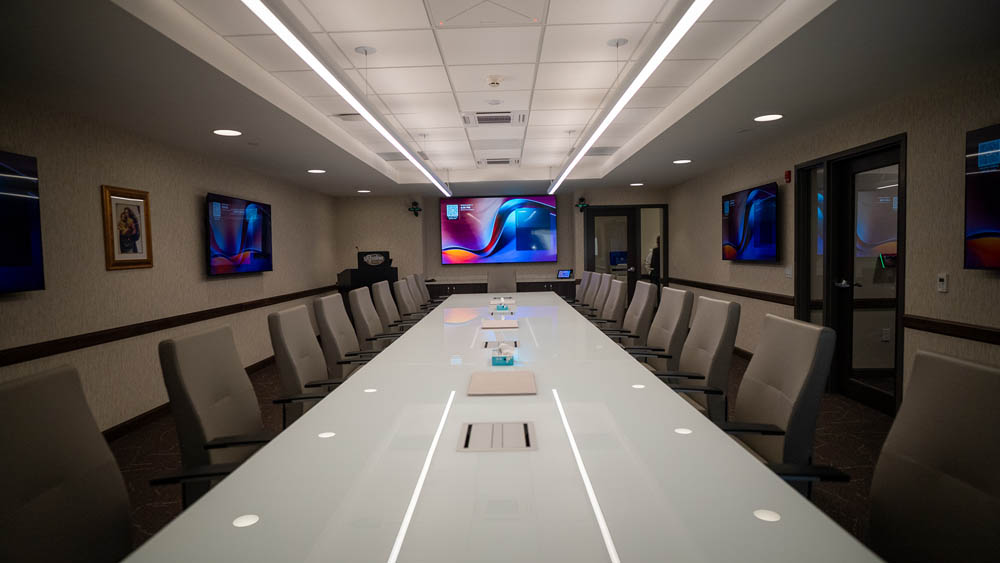
Capstream Technologies emphasizes business-focused AV design for conference rooms, hybrid meeting environments, multi-use spaces, and digital communication across offices in Western and Central New York. Its service model centers on planning, installation, modernization, and support for commercial spaces rather than simple consumer-style equipment swaps.
6. Who Needs Conference Room Audio Visual Solutions?
Almost any organization that depends on meetings can benefit from conference room audio visual solutions. The real question is not whether a business needs AV. It is what level of AV support fits the space and the communication goals.
The most common groups that need these systems include:
- Small businesses adding professionalism to huddle rooms
- Mid-sized companies standardizing meeting quality across teams
- Enterprise offices managing boardrooms, conference suites, and training spaces
- Healthcare groups hosting internal meetings and presentations
- Schools, nonprofits, and institutions using shared collaboration spaces
- Operations teams that need reliable visual communication across departments
The decision makers are often spread across several roles too. IT teams care about reliability and integration. Operations teams care about ease of use. Executives care about productivity and image. Facility leaders care about long-term value and room consistency. A good AV partner helps all of them align.
7. What Equipment Is Needed for a Conference Room AV System?
This is one of the most common search questions, and for good reason. Businesses want a clear answer before they invest. The exact equipment depends on room size, user needs, and meeting style. However, most conference room audio visual solutions include the following core elements.
7.1: Displays or Projectors for Clear Visual Communication
Displays are often the visual center of the room. In smaller spaces, a commercial display may be the best fit. In larger rooms, dual displays or projection systems may work better. The goal is simple. Everyone should see shared content without strain.
7.2: Conference Cameras for Hybrid and Video Meetings
A conference camera helps remote attendees stay part of the conversation. Modern options may include wide-angle cameras, auto-framing systems, or PTZ cameras that adjust for larger spaces. Camera placement also matters. The best image comes from good design, not only a better camera.
7.3: Microphones for Consistent Voice Pickup Across the Room
Microphones shape meeting quality more than most people expect. Tabletop, ceiling, or beamforming microphones can all work well in the right setting. The main goal is even voice pickup across the space. No one should need to lean forward or repeat every point.
7.4: Speakers or Sound Systems for Clear Audio Output
People need to hear remote participants clearly. That may call for ceiling speakers, wall-mounted speakers, or a more advanced distributed audio design. Speaker choice should match room acoustics and room size.
7.5: Video Conferencing Platforms and Room PCs
Most businesses build around one main meeting platform. That could be Microsoft Teams, Zoom, or another unified communication tool. Room PCs or dedicated conferencing appliances help the space launch meetings faster and more consistently.
7.6: Wireless Presentation Systems for Easy Screen Sharing
Wireless presentation tools reduce cable clutter and make collaboration easier. Team members can share content quickly from laptops or mobile devices. That keeps the meeting moving.
7.7: Touch Panels and Control Systems for Simple Meeting Starts
People want one clear way to start the meeting. A touch panel or simple room control system helps reduce training needs and support tickets. Ease of use often decides whether the system succeeds.
7.8: Cabling, Connectivity, and Network Infrastructure Behind the Scenes
These parts are less visible, but they matter just as much. Reliable AV depends on good cabling, signal management, power planning, and network support. Without them, even premium equipment can underperform.
8. The Core Components of a Modern Conference Room Audio Visual Solution
A modern system usually combines hardware, software, and room design into one connected experience. Below are the core pieces that most businesses should evaluate.
Audio Capture and Processing
Clear audio starts with the microphone, but it does not end there. Processing tools help reduce echo, balance levels, and improve speech clarity. In many rooms, this is the difference between a meeting that feels smooth and one that feels tiring.
Video Display and Content Sharing
The display must fit the room. Yet it also must support the way people work. If teams compare spreadsheets, design files, dashboards, or presentations, screen clarity and size become essential. Wireless sharing also improves speed and convenience.
Video Conferencing and Camera Coverage
Hybrid meetings are now normal. Therefore, businesses need cameras that support real visibility, not just a token image from the corner of the room. Better framing and positioning help remote attendees stay engaged.
Control and Automation
A well-designed room should feel simple. One touch to start. One interface to control the display, call, audio, and presentation source. When the system feels easy, adoption goes up.
Unified Communication Platform Integration
This is where the room connects to the company workflow. The AV system should support the conferencing platform your team already uses. That reduces friction and improves consistency from room to room.
Key signs of a strong modern AV solution include:
- simple meeting startup
- clear audio from every seat
- video that supports hybrid participation
- easy content sharing
- dependable performance day after day
- room controls that users understand quickly
9. How to Choose the Right Conference Room Audio Visual Solutions
Choosing the right setup gets easier when you follow a process. Instead of buying gear first, start with how the room will be used.
Step by Step Planning Process for Better Results
Step 1: Define the room purpose.
Will the space host internal meetings, executive calls, training sessions, or client presentations? The answer shapes every other decision.
Step 2: Review room size and layout.
A small huddle room needs a different microphone and camera plan than a long boardroom.
Step 3: Assess acoustics and lighting.
Hard surfaces, glass walls, and poor lighting can weaken performance even when the equipment is strong.
Step 4: Match the system to your main platform.
Build around the conferencing and collaboration tools your teams already use.
Step 5: Prioritize ease of use.
A complex system creates user frustration. A simple system gets used correctly.
Step 6: Plan for growth.
Good conference room audio visual solutions should support future needs, not just today’s meetings.
This step-by-step approach usually prevents overspending on the wrong equipment and underplanning for real-world use.
10. Where Conference Room Audio Visual Solutions Deliver the Most Value
The value of conference room audio visual solutions shows up anywhere communication matters. Still, some spaces see the benefits faster than others.
Boardrooms and Executive Spaces
Leadership meetings often involve sensitive decisions, remote stakeholders, and high-value presentations. Clear communication matters here because delays or confusion can affect the whole business.
Standard Conference Rooms
These are the workhorse spaces of many offices. Because they are used often, even small AV improvements can create a large return in saved time and better meeting flow.
Training Rooms
Training spaces need clear visuals, strong speech pickup, and flexible presentation tools. In these rooms, AV supports learning, engagement, and consistency.
Client-Facing Presentation Spaces
When your business hosts prospects or partners, the room becomes part of your brand image. Smooth technology helps your team stay confident and focused.
Multi-Use Spaces
Some businesses need one room to handle meetings, presentations, webinars, and collaborative sessions. Flexible AV design makes that possible without constant setup changes.
Capstream Technologies highlights conference rooms, hybrid meeting setups, training environments, multi-screen spaces, and broader commercial AV installations as part of its service focus across Buffalo, Western New York, and Central New York.
Conclusion
Modern businesses cannot afford meeting rooms that waste time, weaken communication, or frustrate users. Today, the best meeting spaces are built around clarity, speed, and ease of use. That is why conference room audio visual solutions have become essential for companies that want better collaboration in both in-person and hybrid settings.
When designed well, these systems do more than connect devices. They support better conversations, stronger presentations, and smoother decisions. They also help employees and remote participants feel equally included. From microphones and displays to conferencing tools and room controls, every part of the system should work together.
For businesses that want a more reliable and professional setup, working with a dedicated AV partner can simplify the process. Capstream Technologies presents itself as a turnkey commercial AV provider with design, installation, calibration, modernization, and support for conference rooms, hybrid meeting spaces, and business environments across Western and Central New York. If your current meeting room setup feels outdated, inconsistent, or hard to use, this is exactly when expert guidance can help you plan a better long-term solution.
Ready to improve your meeting spaces? Explore Capstream Technologies AV services and contact their team to discuss a conference room solution built for the way your business works today.

Howard Martin, Jr. is an Owner/Partner at Capstream Technologies with more than 20 years of experience in IT, finance, and business strategy. He oversees finance, accounting, customer support, and business development while helping organizations identify practical technology solutions that support real operational needs.